Stylus as a Probe and Felt Affordances
Designing interaction you can feel through pseudo-haptics and stylus input
- Year
- 2026
- Duration
- Ongoing
- Tools
- Javascript, CSS/HTML, ixfx
- Type
- Individual
- Summary
- The project redefines the stylus from a drawing tool into a material probe - something you use not to inscribe marks, but to sense and feel the qualities of digital surfaces.
Context
Most interfaces rely almost entirely on visual differences to communicate meaning. Buttons, text, and layouts are clearly structured and differentiated on a screen, but when you interact with them, they all behave the same. Dragging a file on your desktop feels no different from dragging a shape in Figma.
In physical environments, affordances are not only visual but also felt. A hammer doesn’t afford hammering just because it looks like a hammer. It also affords it because of how it behaves in the hand, its weight, balance, grip, and how it resists when it meets a nail. These properties are not separate from function, they are what makes the action possible.
Why stylus?
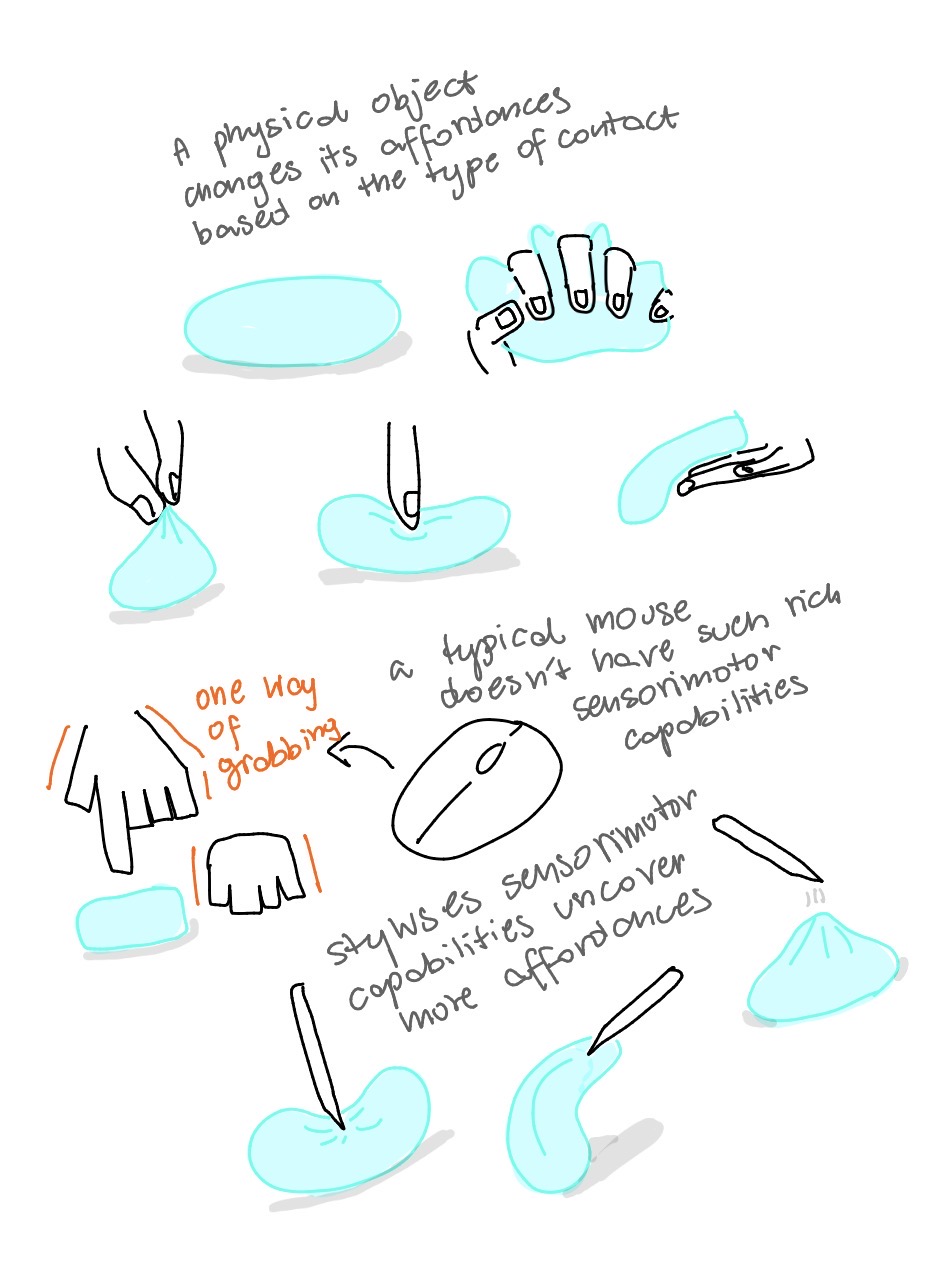
Visual affordances are available to anyone who can see them. Felt affordances are different in a way that they are relational. They exist between the properties of the environment and the capabilities of the user. A chair afford sit-ability to anyone who is suitably able to make use of a chair for sitting. A certain incline may afford climb-ability to you under normal circumstances but now when you have just done 100 squats. The affordance is not in the object or in the body alone. It exists in the contact between them.
In digital space, these capabilities are determined by input devices. An ordinary mouse gives you x/y position and clicks, touch adds limited pressure in some contexts. A stylus adds pressure, tilt, hover, rotation. This creates a much richer sensorimotor vocabulary. As a result, many types of affordances become possible, because affordances only exist when environmental properties meet a body capable of detecting them.
Styluses capabilities currently are almost entirely confined to drawing and writing. Outside of these creative contexts, they are rarely used. The stylus is treated as a digital pen, and its role is reduced to leaving marks.
Stylus as a probe
This project proposes a framing of the stylus not as a marking tool that leaves traces, but a probing tool that lets you explore and “feel” digital space in real time, closer to how a blind person uses a cane to sense the world ahead.
In summary, digital surfaces can carry felt properties; felt properties create affordances; affordances only exist in the contact between surface and sensorimotor capability; the stylus expands that capability; therefore, it is not just a richer input device, but a key condition for making nuanced felt affordances in digital interfaces possible.
Digital elements have felt properties
First thing I explored is digital elements having felt properties. The three draggable folders are visually identical but feel different to drag. The felt properties only reveal themselves through contact. The sketch doesn’t involve the stylus in any particular way, the goal was to establish the premise about in-action not-visual feeling of the behavior.
Felt properties can be relational, not just fixed
The folders have fixed properties (if it feels bouncy, it is always bouncy no matter how you interact with it). The next sketch explored a material that changes through use.
The sketch is a resizable window, a window you just opened would feel stiff and cold, harder to manipulate. But the more you interact with it, the warmer and softer it becomes.
These are the textures that start as identical (all windows would feel stiff at the beginning) but the difference start to show up through interaction. You could imagine that if you have a few of these windows opened on your desktop, you would be able to feel which one you’ve spent the most time with just by “touching”.
Affordances exist in the contact
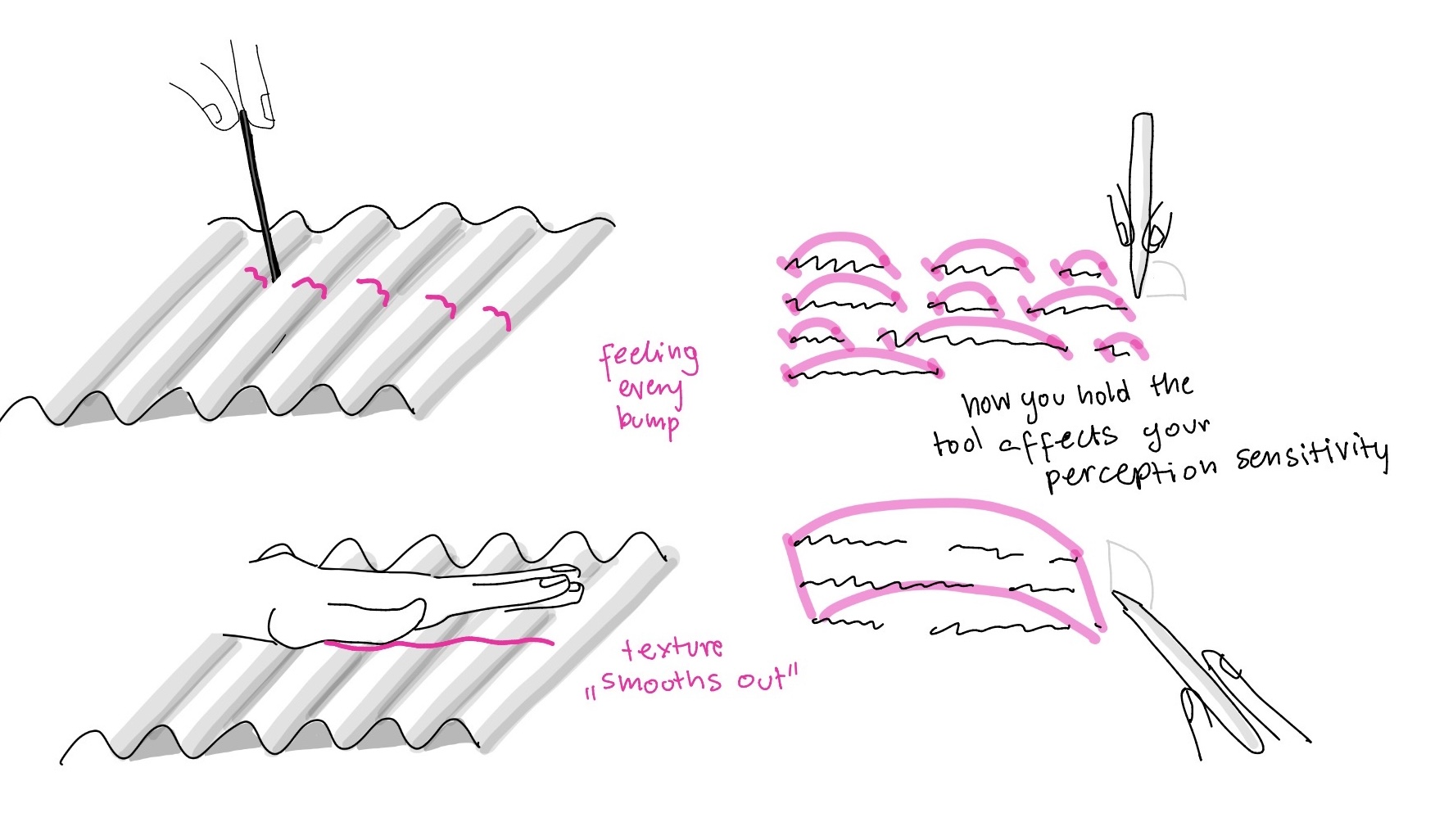
Then I started thinking about texture perception that changes based on the tool you use. If you run a thin stick across a bumpy surface, you would feel every ridge, but if you drag your palm across it, the bumps average out into something smoother. The texture is the same, but what changes is the tool, and with it the scale of what you feel.
I experimented with feeling text. As you select the text and hold the stylus straight you feel every word as a bump. But if you start tilting the stylus, the bumps start to blend together, into sentences and then paragraphs, and you get a more general sense of the text as a whole. The tilt in this case changes the scale of perception.
The stylus’s vocabulary unlocks affordances
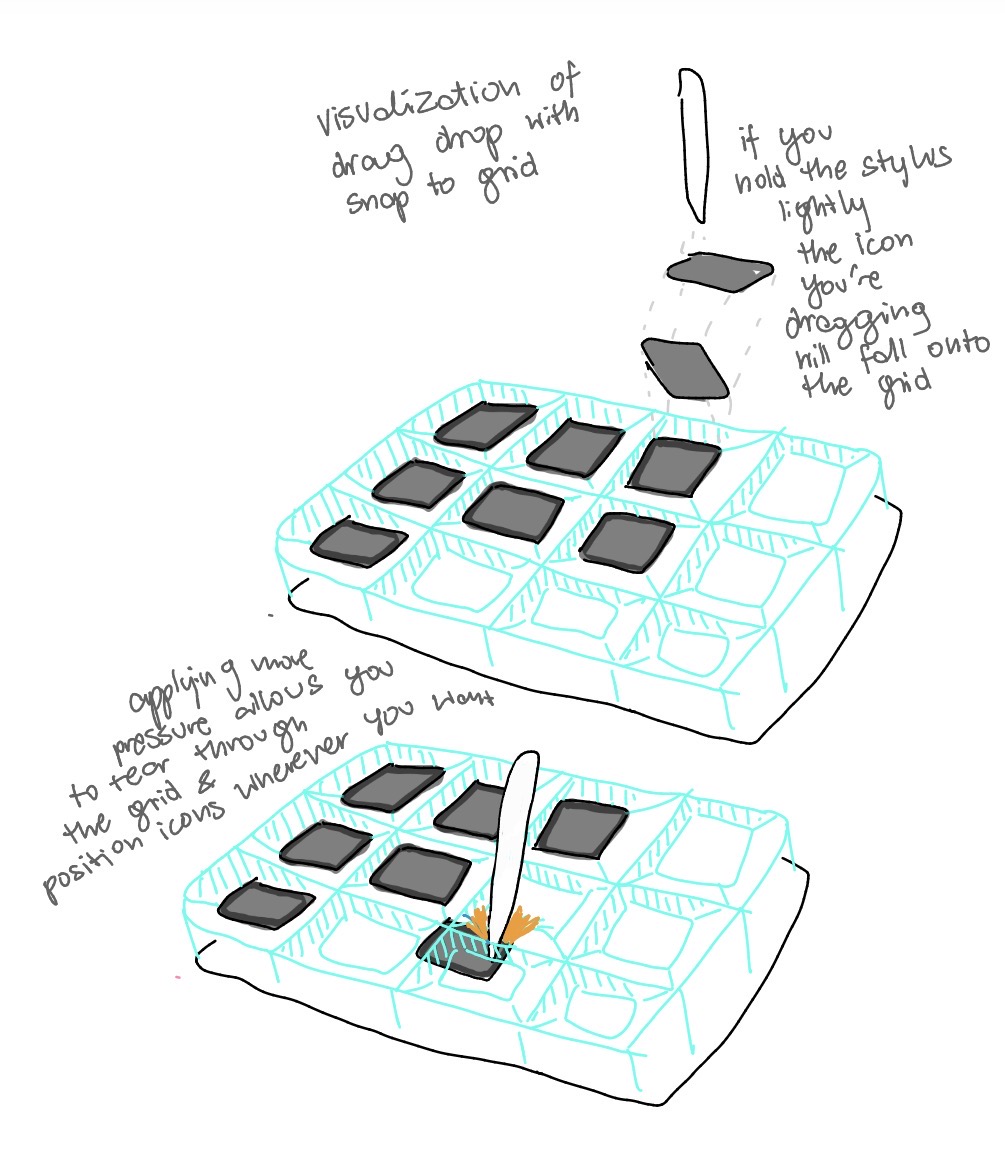
The next sketch was an exploration of the stylus as a probe that can unlock certain affordances. In this sketch, you drag icons in a simple drag-and-drop interface with a snap-to-grid constraint. When using the stylus lightly, the icon follows the grid as expected. But when you press harder, you can tear through the constraint and place the icon freely, anywhere on the desktop. The system’s rules are still the same, but the stylus allows you to feel and break them when you want to.
This affordance is not equally available across inputs. With a finger, the same surface only supports dragging along the grid, because the finger is not capable of exerting the necessary pressure to break the constraint.
This sketch shows that felt affordances are tool-dependent. The possibility for free placement exists in the system, but it only becomes accessible through a specific kind of contact. A finger and a stylus can touch the same interface and still encounter different affordances.
To be continued…
This project is ongoing and will continue to explore the potential of stylus interaction as a way to create richer, more nuanced digital affordances that are felt rather than just seen.